Arduino Loader
Program Loading - Schematic - Differences Between the Loader of the NQSAP/NQSAP-PCB and the BEAM - Useful Links
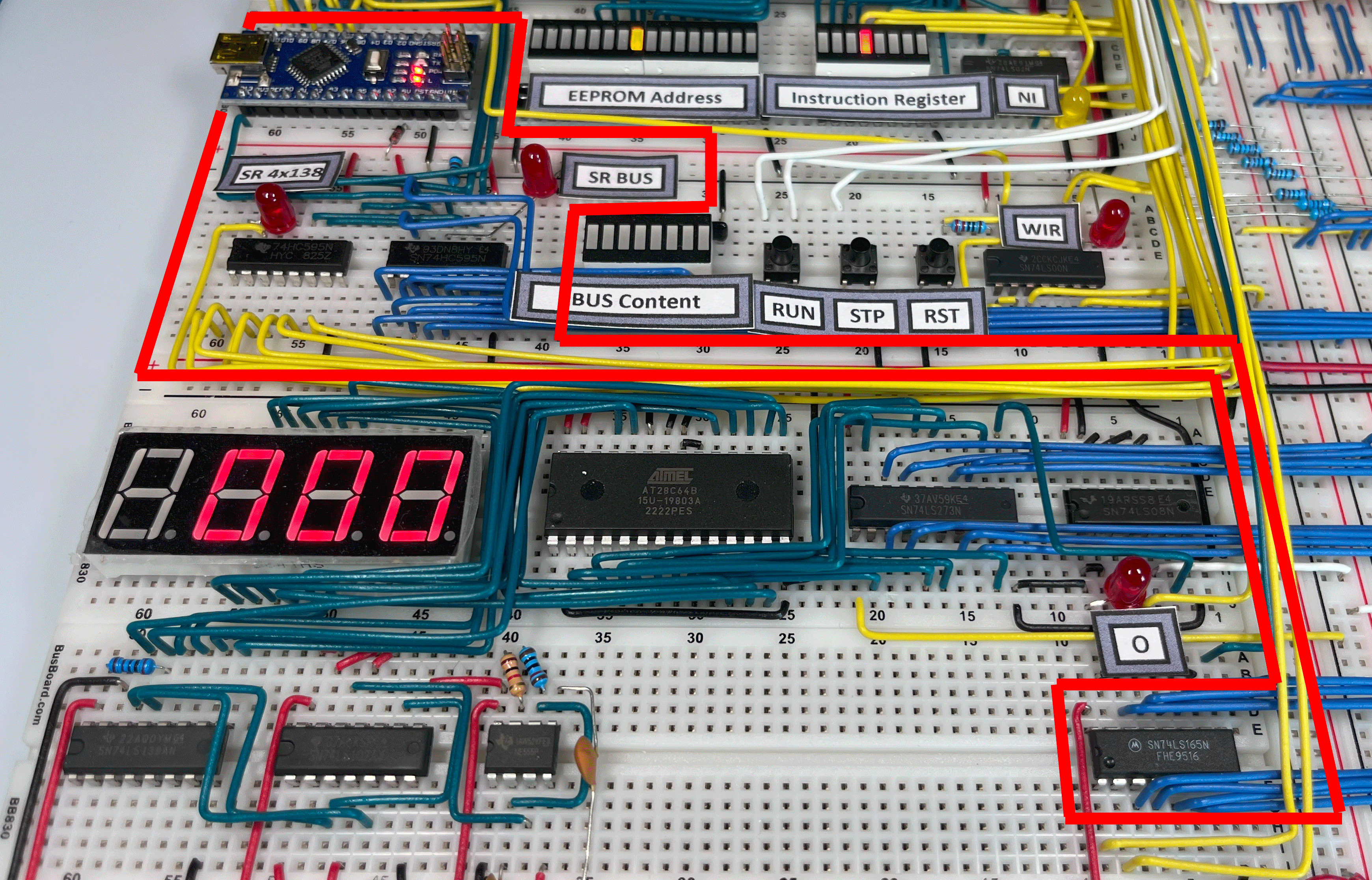
After completing the 8-bit SAP-1 computer, I was looking for a way to automate loading programs into memory, as doing so manually every time the system was powered on using the dip-switches was quite tedious. I also intended to frame it and hang it as a piece of artwork to show visitors. Gaining confidence with Arduino, I realized I could connect its outputs to MAR, RAM, and the Write button to automatically manage the computer’s programming, simulating the manual sequences precisely.
I started from a project by Dmytro Striletskyi, modifying it to automatically load and execute two programs, ‘Fibonacci’ and ‘Counter,’ each with a specific execution duration. At the end of each execution cycle, the Arduino stops the clock, loads the next program into memory, reactivates the clock, and resets the computer.
The number of required signals (8 bits for RAM, 4 for addresses, Reset, Start/Stop Clock, Write Memory, and Program Mode, totaling 16) allowed the use of an Arduino Nano without the need for additional components.
In BEAM, program loading can be performed either manually or automatically, thanks to the Loader module, which is an improvement over the one used in the SAP.
I had carefully studied Tom’s two implementations, which differed between NQSAP and NQSAP-PCB, and decided to leverage what I had learned from the shift register-based approach in NQSAP-PCB.
My implementation includes two 8-bit shift registers, the 74HC595, and a parallel-load 8-bit shift register, the 74LS165. The former are used to write to the BEAM, while the latter is used to read from the bus.
Program Loading
The Loader activates three control signals and one clock signal:
- CLK-Start, which temporarily disables the astable circuit of the clock module and reactivates it at the end of the programming process, automatically starting the execution of the newly loaded program.
- LDR-Active, which disables the output of clock signals generated by the BEAM (both astable and manual monostable), as well as the two EEPROMs that control the ‘138 decoders and some other control signals. These latter signals are not currently managed by the Loader; a future upgrade should allow testing of the Flag and H registers.
- Reset, which prevents the RC from incrementing during programming.
- LDR-CLK, which replaces the computer’s clock to allow the Loader to program the RAM.
The write operation for a byte is performed in two steps, repeated for the entire length of the program to be loaded:
- Loading the MAR with the memory address to be written (function
setAddress(byte address)). - Writing the program byte to the RAM (function
writeRAM(byte data)).
void setAddress(byte address)
{
  // Activate the '595
  digitalWrite(SHIFT_ENABLE_1, LOW);
  digitalWrite(SHIFT_ENABLE_2, LOW);
  // Load address and WM signal into the '595
  shiftOut(SHIFT_DATA, SHIFT_CLK, MSBFIRST, address); // address
  shiftOut(SHIFT_DATA, SHIFT_CLK, MSBFIRST, 0x70); // Configure the '138 for MAR writing (WM)
  // Update the '595 output with the loaded data above
  digitalWrite(SHIFT_LATCH, LOW);
  digitalWrite(SHIFT_LATCH, HIGH);
  digitalWrite(SHIFT_LATCH, LOW);
  // Clock pulse
  digitalWrite(LDR_CLK, LOW);
  digitalWrite(LDR_CLK, HIGH);
  delay(DELAY); // 1 ms
  digitalWrite(LDR_CLK, LOW);
  digitalWrite(SHIFT_ENABLE_1, HIGH);
  digitalWrite(SHIFT_ENABLE_2, HIGH);
}

void writeRAM(byte data)
{
  // Activate the '595
  digitalWrite(SHIFT_ENABLE_1, LOW);
  digitalWrite(SHIFT_ENABLE_2, LOW);
  // Load the byte and WR signal into the '595.
  shiftOut(SHIFT_DATA, SHIFT_CLK, MSBFIRST, data); // Byte from
  shiftOut(SHIFT_DATA, SHIFT_CLK, MSBFIRST, 0x60); // Configure the 138 for RAM write (WR)
  // Update the output of the '595 with what was loaded above
  digitalWrite(SHIFT_LATCH, LOW);
  digitalWrite(SHIFT_LATCH, HIGH);
  digitalWrite(SHIFT_LATCH, LOW);
  // Clock pulse
  digitalWrite(LDR_CLK, LOW);
  digitalWrite(LDR_CLK, HIGH);
  delay(DELAY); // 1 ms
  digitalWrite(LDR_CLK, LOW);
}
At the end of the writing process, the ‘165 is used to read the content of the computer’s last memory location and temporarily store it on the Loader, allowing the execution of a light game on the LEDs that display the contents of the RAM. The game consists of scrolling the LEDs to simulate the effect of the iconic scanner from the car KITT from the TV series Knight Rider. To execute this effect, the scrolling pattern is loaded into the mentioned location, and for this, it must be restored at the end of the routine.
After the light game, the content of the last memory location is restored, and control is passed to the loaded program: the ‘595 are disabled, the ROMs are reactivated, the Reset is deactivated, and the clock is re-enabled.
The Loader also includes a manual Reset button.
Schematic
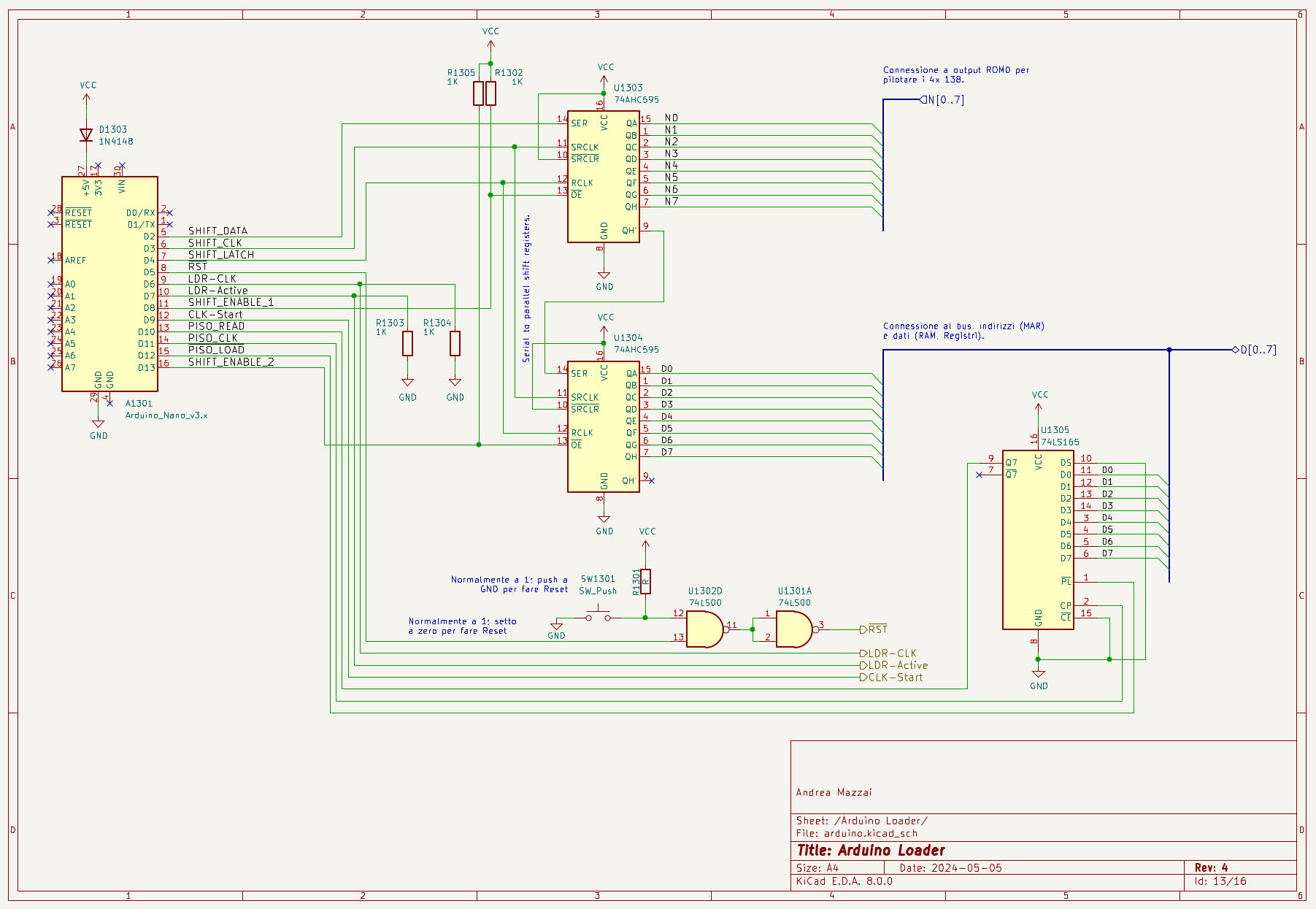
Schematic of the BEAM computer Loader.
Differences Between the Loader of the NQSAP/NQSAP-PCB and the BEAM
In the implementations of the Loader for his projects, Tom uses Flip-Flops or Shift Registers to drive the control signals and Arduino pins to write and read from the bus. The BEAM Loader, on the other hand, uses Shift Registers both for writing and reading from the bus, and for managing most of the signals. Several pins on the Arduino remain available, which could be used in the future to control other signals and perform functionality tests on the various registers of the computer.
Useful Links
- The Loader of the NQSAP by Tom Nisbet.
- The Loader of the NQSAP-PCB by Tom Nisbet.